
HP ProLiant BL20p Generation 2 Server Blade Setup and Installation Guide

Installing the Server Blade and Options
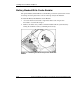
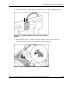
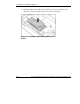
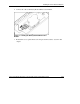
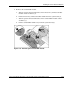
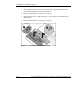
2. Remove the standard NIC module:
a. Turn the quarter-turn standoff latches on the Smart Array 5i Plus Controller
module counter-clockwise (1).
b. Lift the Smart Array 5i Plus Controller module from the system board (2).
c. Turn the quarter-turn standoff latches on the standard NIC module counter-
clockwise (3).
d. Lift the standard NIC module away from the system board (4).
Figure 1-10: Removing the standard NIC module
HP ProLiant BL20p Generation 2 Server Blade Setup and Installation Guide 1-15
HP CONFIDENTIAL
Writer: Amy Clute File Name: b-ch1 Installing the Server Blade and Options.doc
Codename: Nipper Part Number: 307158-002 Last Saved On: 9/8/03 2:09 PM