
HP ProLiant BL20p Generation 2 Server Blade Setup and Installation Guide

Installing the Server Blade and Options
Dual Port Fibre Channel Mezzanine Card
An optional dual port Fibre Channel (FC) mezzanine card enables Fibre Channel
support, for clustering capabilities, and SAN connection when used in conjunction
with the RJ-45 Patch Panel 2 or any other interconnect that supports a SAN
connection. The card replaces the standard NIC module that is shipped with some
server blades. Both the standard NIC module and the FC mezzanine card have two
10/100/1000 NICs. Refer to “SAN Configuration Overview” in Chapter 2 for more
information about connecting to the SAN.
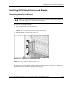
To install the FC mezzanine card:
NOTE: Perform these steps only if you are replacing the standard NIC module with the FC
mezzanine card option. The FC mezzanine card may already be installed on some server
blades. Refer to the HP Dual Port Fibre Channel Mezzanine Card Installation Instructions for
more information.
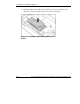
1. Remove the access panel. Refer to Figure 1-2.
1-14 HP ProLiant BL20p Generation 2 Server Blade Setup and Installation Guide
HP CONFIDENTIAL
Writer: Amy Clute File Name: b-ch1 Installing the Server Blade and Options.doc
Codename: Nipper Part Number: 307158-002 Last Saved On: 9/8/03 2:09 PM