
HP ProLiant BL20p Generation 2 Server Blade Setup and Installation Guide

Installing the Server Blade and Options
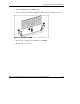
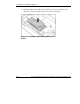
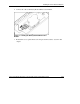
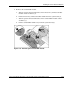
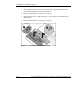
6. Connect the cable to the Battery-Backed Write Cache Enabler.
Figure 1-9: Cabling the Battery-Backed Write Cache
Enabler
7. Reinstall the access panel. Refer to the “Preparation Procedures” section in this
chapter.
HP ProLiant BL20p Generation 2 Server Blade Setup and Installation Guide 1-13
HP CONFIDENTIAL
Writer: Amy Clute File Name: b-ch1 Installing the Server Blade and Options.doc
Codename: Nipper Part Number: 307158-002 Last Saved On: 9/8/03 2:09 PM