
HP ProLiant BL20p Generation 2 Server Blade Setup and Installation Guide

Installing the Server Blade and Options
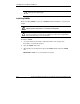
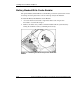
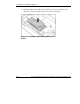
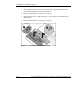
3. Connect the cable to the bottom of the Smart Array 5i Plus Controller module.
Figure 1-6: Cabling the Smart Array 5i Plus Controller
module
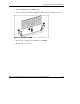
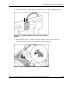
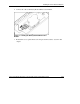
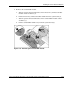
4. Install the Smart Array 5i Plus Controller module into the system board by
seating it onto the connector (1) and turning the standoffs (2).
Figure 1-7: Installing the Smart Array 5i Plus Controller
HP ProLiant BL20p Generation 2 Server Blade Setup and Installation Guide 1-11
HP CONFIDENTIAL
Writer: Amy Clute File Name: b-ch1 Installing the Server Blade and Options.doc
Codename: Nipper Part Number: 307158-002 Last Saved On: 9/8/03 2:09 PM