
HP ProLiant BL20p Generation 2 Server Blade Setup and Installation Guide

Installing the Server Blade and Options
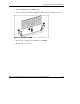
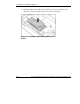
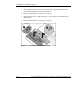
4. Insert the DIMM into the DIMM slot (1).
5. Press down firmly. When the DIMM seats fully in the slot, the latches close (2).
Figure 1-4: Installing a DIMM
6. Repeat steps 2 through 5 to install the second DIMM.
7. Reinstall the access panel.
HP ProLiant BL20p Generation 2 Server Blade Setup and Installation Guide 1-9
HP CONFIDENTIAL
Writer: Amy Clute File Name: b-ch1 Installing the Server Blade and Options.doc
Codename: Nipper Part Number: 307158-002 Last Saved On: 9/8/03 2:09 PM