
HP ProLiant BL20p Generation 2 Server Blade Setup and Installation Guide

Installing the Server Blade and Options
CAUTION: Use only HP DIMMs. DIMMs from other sources are known to
adversely affect data integrity.
Installing DIMMs
Before installing DIMMs, review the “DIMM Installation Guidelines” section in this
chapter.
WARNING: To reduce the risk of personal injury from hot surfaces, allow the
internal system components to cool before touching them.
CAUTION: Electrostatic discharge can damage electronic components. Properly
ground yourself before beginning any installation procedure. Refer to Appendix B,
“Electrostatic Discharge,” for more information.
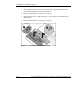
To install a DIMM:
1. Access the internal server blade components. Refer to the “Preparation
Procedures” section in this chapter.
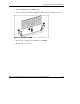
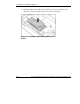
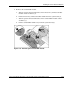
2. Open the DIMM slot latches.
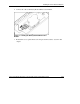
3. Align the key slot in the bottom edge of the DIMM with the tab in the DIMM
slot.
IMPORTANT: DIMMs do not seat if turned the wrong way.
1-8 HP ProLiant BL20p Generation 2 Server Blade Setup and Installation Guide
HP CONFIDENTIAL
Writer: Amy Clute File Name: b-ch1 Installing the Server Blade and Options.doc
Codename: Nipper Part Number: 307158-002 Last Saved On: 9/8/03 2:09 PM