
HP ProLiant BL20p Generation 2 Server Blade Setup and Installation Guide

Installing the Server Blade and Options
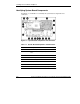
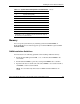
Table 1-1: System Board Components and Connectors continued
Item Description
9 System Switch (SW3)
10 System Configuration Switch (SW1)
11 Processor socket 1 (populated)
12 Fan connectors
13 Power button/LED board connector*
14 SCSI backplane board connector
15 Processor socket 2
16 Processor power module slot 2
17 Optional Battery-Backed Write Cache Enabler
*Depending on the configuration and model, this item may not
be found on your system board.
Memory
You can expand system memory by installing synchronous DDR DIMMs. A
ProLiant BL20p G2 server blade supports up to four PC2100 ECC registered DDR
SDRAM DIMMs.
DIMM Installation Guidelines
You must observe the following guidelines when installing additional memory:
•
•
•
Install only PC2100 registered DDR, 3.3-V, 72-bit wide, ECC DIMMs in the
server blade.
Install identical DIMMs as pairs only, starting with DIMM socket 1, bank A.
Populate both slots in a bank at the same time: DIMMs 1 and 2 reside in bank A,
and DIMMs 3 and 4 reside in bank B.
NOTE: The server blade ships with at least two DIMMs installed in DIMM slots 1A
and 2A.
HP ProLiant BL20p Generation 2 Server Blade Setup and Installation Guide 1-7
HP CONFIDENTIAL
Writer: Amy Clute File Name: b-ch1 Installing the Server Blade and Options.doc
Codename: Nipper Part Number: 307158-002 Last Saved On: 9/8/03 2:09 PM