
HP ProLiant BL20p Generation 2 Server Blade Setup and Installation Guide

Installing the Server Blade and Options
4. Place the server blade on a flat, level surface.
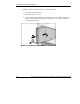
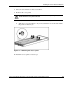
5. Remove the access panel:
WARNING: To reduce the risk of electric shock, do not power up the server
blade with the access panel removed.
a. Loosen the thumbscrew on the rear of the server blade (1).
b. Slide the access panel about 1 cm (3/8 in) toward the rear of the unit and lift
the panel to remove it (2).
Figure 1-2: Removing the access panel
To install the access panel, reverse step 5.
HP ProLiant BL20p Generation 2 Server Blade Setup and Installation Guide 1-5
HP CONFIDENTIAL
Writer: Amy Clute File Name: b-ch1 Installing the Server Blade and Options.doc
Codename: Nipper Part Number: 307158-002 Last Saved On: 9/8/03 2:09 PM