
HP ProLiant BL20p Generation 2 Server Blade Setup and Installation Guide

LEDs and Switches
E-10 HP ProLiant BL20p Generation 2 Server Blade Setup and Installation Guide
HP CONFIDENTIAL
Writer: Amy Clute File Name: h-appe LEDs and Switches.doc
Codename: Nipper Part Number: 307158-002 Last Saved On: 9/8/03 2:16 PM
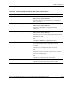
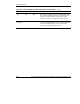
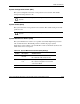
Table E-4: System Maintenance Switch (SW4) Settings continued
Position Description On/Off Function
4 Reserved
5 Password
Clear
Off = Power-on password is normal.
On = Power-on password is disabled.
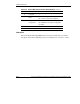
6 Invalidate
Configuration
Off = Normal.
On = ROM treats the system configuration
as invalid.
7 Reserved
8 Reserved
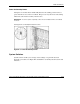
NMI Switch
The non-maskable interrupt (NMI) switch is for use by trained service personnel
only. Refer to the HP ProLiant BL p-Class System Maintenance and Service Guide.