
HP ProLiant BL20p Generation 2 Server Blade Setup and Installation Guide

LEDs and Switches
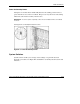
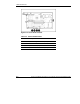
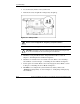
System Configuration Switch (SW1)
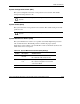
The system configuration switch is a four-position reserved switch. The default
setting for all four positions is off.
CAUTION: Do not change any SW1 settings or the system may not function
properly.
System Switch (SW3)
The system switch is a four-position reserved switch. The default setting for all four
positions is off.
CAUTION: Do not change any SW3 settings or the system may not function
properly.
System Maintenance Switch (SW4)
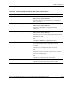
The system maintenance switch is an 8-position switch that implements protection
and override functions. The default position is off. For the proper system
maintenance switch settings, refer to Table E-4 or refer to the labels attached to the
inside of the server access panel.
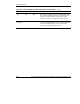
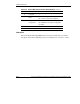
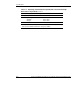
Table E-4: System Maintenance Switch (SW4) Settings
Position Description On/Off Function
1 iLO Security
Override
Off = iLO Security is enabled.
On = Overrides iLO security function.
2 Configuration
lock
Off = System configuration can be modified.
On = System configuration is locked and
cannot be modified.
3 Reserved
continued
HP ProLiant BL20p Generation 2 Server Blade Setup and Installation Guide E-9
HP CONFIDENTIAL
Writer: Amy Clute File Name: h-appe LEDs and Switches.doc
Codename: Nipper Part Number: 307158-002 Last Saved On: 9/8/03 2:16 PM