
HP ProLiant BL20p Generation 2 Server Blade Setup and Installation Guide

LEDs and Switches
WARNING: Before removing a hard drive, read the hot-plug hard drive
replacement section in the HP ProLiant Servers Troubleshooting Guide.
•
•
•
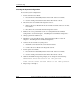
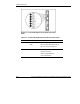
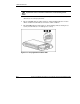
The first LED indicates drive activity status (1), where on indicates activity and
off indicates no activity by the drive.
The second LED indicates online status (2), where flashing indicates an active
online condition and off indicates an inactive online condition.
The third LED indicates fault status (3), where flashing indicates fault-process
activity and off indicates a no-fault-process activity.
Figure E-2: Hot-plug SCSI hard drive LEDs
E-4 HP ProLiant BL20p Generation 2 Server Blade Setup and Installation Guide
HP CONFIDENTIAL
Writer: Amy Clute File Name: h-appe LEDs and Switches.doc
Codename: Nipper Part Number: 307158-002 Last Saved On: 9/8/03 2:16 PM