
HP ProLiant BL System Common Procedures Guide

Server Blade Recovery
5. Each server blade can have the “server change rule” set to run the predefined
event named “spare.”
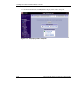
To find the “server change rule” from the RDP console:
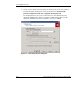
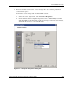
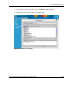
a. Select the server, right click , and click Server Properties.
b. On the left side of the Computer Properties screen, click the Bay icon. This
will allow RDP to automatically put the spare image on the new server blade,
and return the service to a recoverable state.
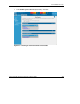
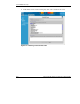
Figure 2-2: Computer Properties dialog box
HP ProLiant BL System Common Procedures Guide 2-5
HP CONFIDENTIAL
Writer: Jennifer Hayward File Name: c-ch2 Server Blade Recovery.doc
Codename: Part Number: 351360-001 Last Saved On: 12/9/03 4:21 PM