
HP ProLiant BL System Common Procedures Guide

Server Blade Recovery
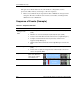
Table 2-1: Sequence of Events continued
Event Details
Server Recovery
1. Insight Manager 7 detects the failed server blade and a batch file is started
which passes information on the failed server blade to RDP.
2. RDP provisions the spare server blade (20) with the image that was
originally used for server blade 5.
Operational
without a spare
Server blade 20, now
running, has taken the
role of server blade 5.
In service
blades
In service
blades
Faulty server
blade replaced
with a new spare
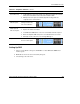
Manual intervention:
1. Replace the failed server blade.
2. Install Windows 2000 Server on the new server blade and name it “spare.”
3. Delete the duplicate RDP entry for the server blade that was recovered.
4. Manually execute a discovery scan in Insight Manager 7.
Operational The new server blade in
slot 5 is now the spare.
In service
blades
spare
In service
blades
In service
blades
spare
Setting Up RDP
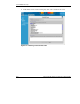
1. Select a server blade as the spare and build it as a base Windows 2000 server
named “spare.”
2. Build the set of servers to be serviced by the spare.
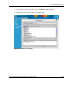
3. Create images of each server.
HP ProLiant BL System Common Procedures Guide 2-3
HP CONFIDENTIAL
Writer: Jennifer Hayward File Name: c-ch2 Server Blade Recovery.doc
Codename: Part Number: 351360-001 Last Saved On: 12/9/03 4:21 PM