
HP ProLiant BL System Common Procedures Guide

Server Blade Recovery
The spare server blade must have the same hardware configuration, such as
processors, NICs, memory, and storage, as the one it replaces.
• This recovery method may be repeated for other combinations of target servers
and spares. Be sure to make the server names, event names, and image names
different for each combination.
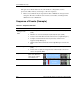
Sequence of Events (Example)
Table 2-1: Sequence of Events
Event Details
Set up Insight
Manager 7 and
RDP
1. Build the spare server blade as a Windows® 2000 server named “spare.”
(RDP)
2. Build the set of servers that may be replaced by the spare. (RDP)
3. Create an event that will monitor the desired servers. (Insight Manager 7)
4. Configure a task that will run when the previously created event is
triggered. (Insight Manager 7)
5. Write the batch file that will execute when Insight Manager 7 executes the
task.
Create Images
1. Create images for each server that might be replaced by the “spare.”
(RDP)
2. Create events to deploy the images that are named exactly as the server
name to be repaired. (RDP)
Operational Server blade 20 is the
spare server blade and
can be used to replace
server blades 3-13.
In Service Blades
spare
In Service Blades
spare
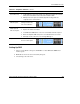
Failure occurs Server blade 5 fails.
In service
blades
spare
In service
blades
spare
continued
2-2 HP ProLiant BL System Common Procedures Guide
HP CONFIDENTIAL
Writer: Jennifer Hayward File Name: c-ch2 Server Blade Recovery.doc
Codename: Part Number: 351360-001 Last Saved On: 12/9/03 4:21 PM