
HP ProLiant BL System Common Procedures Guide



Installing the F5 Networks BIG-IP Blade Controller
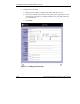
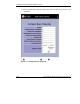
7. Complete the form fields:
a. Enter Pool name. Enter a member’s IP address and select service.
b. Select the load balancing method and any other options appropriate to your
environment, and click >> to add that member to the pool. Repeat this step
for each member.
c. Click Done.
Figure 1-4: Adding pool information
1-14 HP ProLiant BL System Common Procedures Guide
HP CONFIDENTIAL
Writer: Jennifer Hayward File Name: b-ch1 Big IP Blade Controller.doc
Codename: Boston Part Number: 351360-001 Last Saved On: 12/9/03 4:38 PM