
HP ProLiant BL System Common Procedures Guide

Installing the F5 Networks BIG-IP Blade Controller
14. At the Reboot Prompt screen, select a time to reboot the server blade. You must
reboot the server blade to complete the license activation.
Creating a Virtual IP and Pool
The following steps describe the process to create a virtual IP and pool.
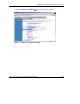
1. Using a Web browser, connect to the Blade Controller webpage created in the
section “Run the Setup Utility,” earlier in this chapter.
2. Click Yes to proceed with the security alert.
3. Enter the Web server username and password created by the Configuration
Utility.
1-10 HP ProLiant BL System Common Procedures Guide
HP CONFIDENTIAL
Writer: Jennifer Hayward File Name: b-ch1 Big IP Blade Controller.doc
Codename: Boston Part Number: 351360-001 Last Saved On: 12/9/03 4:38 PM