
HP ProLiant BL System Common Procedures Guide

Installing the F5 Networks BIG-IP Blade Controller
6. At the Manual Authorization screen, retrieve the dossier using one of the
following methods:
— Copy the entire contents of the Product Dossier box.
— Click Download Product Dossier, and save the dossier to the hard drive.
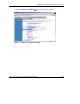
7. Click (http://activate.f5.com/f5/index.jsp) in the License Server box:
8. The Activate F5 License screen opens in a new Web browser.
9. On the Activate F5 License screen, submit the dossier using one of the following
methods, depending on a previous selection:
— To copy the contents of the Product Dossier, paste the copied data copied
from the Product Dossier box into the Enter your Dossier box and then click
Activate.
— To save the dossier to the hard drive, click Browse in the Product Dossier
box to locate the dossier on the hard drive and then click Activate.
The screen displays a signed license file.
10. Retrieve the license file using one of the following methods:
— Copy the entire contents of the signed license file.
— Click Download license, and save the license file to the hard drive.
11. Return to the Manual Authorization screen, and click Continue.
12. At the Install License screen, submit the license file using one of the following
methods, depending on a previous selection:
— To copy the contents of the license file, paste the data copied from the signed
license file into the License Server Output box and then click Install
License.
— To save the license to the hard drive, click Browse in the License File box to
locate the license file on the hard drive and then click Install License.
The License Status screen displays the status messages, and the message
“Process complete” is displayed when the BIG-IP software has finished
activating the license.
13. To finish the licensing process, click License Terms, review the EULA, and
accept it.
HP ProLiant BL System Common Procedures Guide 1-9
HP CONFIDENTIAL
Writer: Jennifer Hayward File Name: b-ch1 Big IP Blade Controller.doc
Codename: Boston Part Number: 351360-001 Last Saved On: 12/9/03 4:38 PM