
HP ProLiant BL p-Class System Setup and Installation Guide

Installing System Hardware
HP ProLiant BL p-Class System Setup and Installation Guide 3-17
HP CONFIDENTIAL
Writer: Christine Portillo File Name: d-ch3 Installing System Hardware.doc
Codename: ICE Part Number: 230852-002 Last Saved On: 11/20/02 4:54 PM
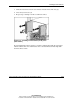
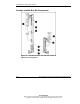
Figure 3-13: Installing cage nuts
NOTE: Enclosures and cables have been removed from the following figures for clarity.
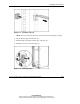
2. Align a bus bar hinge with the rack (1).
3. Slide the hinge toward the outside edge of the rack (2).
4. Install the screws to secure the hinge (3).
Figure 3-14: Installing hinges