
HP ProLiant BL p-Class System Setup and Installation Guide

Installing System Hardware
3-4 HP ProLiant BL p-Class System Setup and Installation Guide
HP CONFIDENTIAL
Writer: Christine Portillo File Name: d-ch3 Installing System Hardware.doc
Codename: ICE Part Number: 230852-002 Last Saved On: 11/20/02 4:54 PM
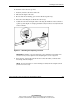
Figure 3-2: Inserting the rear of the rack rail
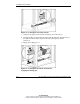
7. Compress the spring-loaded rack rail toward the rear of the rack (1).
8. Using the marks you made when measuring with the template, align the front of
the right rail with the holes and release the rail, allowing it to lock into
position (2).
9. Engage the locking gear (3).
Figure 3-3: Inserting the front of the rack rail and
engaging the locking gear