
HP ProLiant BL p-Class System Diagnostic Station User Guide


8 HP ProLiant BL p-Class System Diagnostic Station User Guide
HP CONFIDENTIAL
Writer: Amy Clute File Name: 230859-3.doc
Codename: Nipper Part Number: 230859-003 Last Saved On: 10/3/03 11:09 AM
CAUTION: Properly ground yourself before beginning any installation procedure.
Electrostatic discharge can damage electronic components. For more information
about electrostatic discharge, refer to the setup and installation guide.
CAUTION: Disconnect the I/O or diagnostic cable when not in use. The port and
connector do not provide permanent connections.
Using the Diagnostic Cable or the I/O Cable for
Configuration or Diagnostic Procedures
Use either the diagnostic cable or the I/O cable to perform some server blade
configuration and diagnostic procedures. Depending on the model, the server blade
will have either a diagnostic port or an I/O port. The I/O port only accepts the I/O
cable and the diagnostic port only accepts the diagnostic cable. If the server blade has
an I/O icon next to the port on the front of the server blade, use the I/O cable. If the
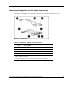
port has no icon, use the diagnostic cable. Refer to Figure 2 to identify the I/O icon.
Figure 2: I/O cable with large view of the I/O icon