
HP ProLiant BL p-Class System Diagnostic Station User Guide
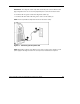
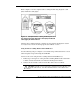
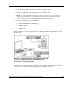
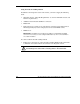
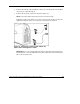
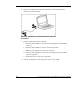
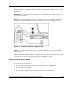

• The TCP/IP address or DNS/WINS name of the iLO
— When using the direct cabling method, use the 192.168.1.1 for the TCP/IP
address and 255.255.255.0 for the subnet mask.
— When using the network cabling method, look on the iLO Default Network
Settings tag for first time access.
• A valid user ID and password with appropriate iLO privileges for accessing
Remote Console
This information is also available on the iLO Default Network Settings tag for
initial access information.
Be sure that the IP address and subnet mask of the client PC are compatible with the
IP address and subnet mask of the iLO diagnostic port. In addition, be sure that the
browser bypasses any proxy servers for the IP address or DNS/WINS name of the
iLO.
GbE Interconnect Switch
You can configure or troubleshoot a GbE interconnect switch in an out-of-rack
environment. In this situation, the diagnostic station provides power to the
interconnect switch. Use the following items from the diagnostic station kit:
• Diagnostic station
• DC power cord (for interconnect switch)
• Network cable with RJ-45 connectors
• AC power cord
For setup and operating instructions, refer to the documentation that ships with the
interconnect switch.
HP ProLiant BL p-Class System Diagnostic Station User Guide 29
HP CONFIDENTIAL
Writer: Amy Clute File Name: 230859-3.doc
Codename: Nipper Part Number: 230859-003 Last Saved On: 9/10/03 8:46 AM