
HP ProLiant BL p-Class System Diagnostic Station User Guide
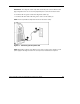
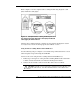
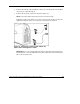
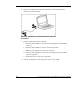
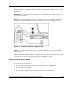

NOTE: iLO may take up to 90 seconds to establish a secure network connection.
iLO Guidelines for Accessing the Server Blade
Use the following guidelines when you prepare to access the server blade with the
iLO Remote Console for the first time.
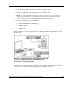
Two ways are available to make the wiring connections from the client PC to the
iLO: the direct cabling method and the network cabling method.
NOTE: Refer to the setup and installation guide for the server blade you are using for
information on accessing the server blade with the iLO Remote Console.
NOTE: If using the RJ-45 connector on the Diagnostic Station to connect to iLO, the iLO
connector from the iLO interconnects is disabled.
Direct Cabling Method
In this method, the client PC is connected to the iLO using the diagnostic port or the
I/O port on the front of the server blade. This is a direct, one-to-one connection using
the diagnostic cable or the I/O cable from the client PC to iLO without any
hub/switch networking hardware. The iLO diagnostic port static IP address can be
found on the diagnostic cable and the I/O port static IP address can be found on the
I/O cable.
Network Cabling Method
In this method, the client PC is connected to the iLO using a hub/switch and the
network connections of the diagnostic station. The iLO default configuration enables
the server blade to obtain its IP address from a DHCP server.
NOTE: If you have edited the configuration to use a static IP address, iLO uses this same
static IP address when you connect with the network cabling method.
Connection Information and Browser Compatibility
To access iLO, you need some basic connection information:
28 HP ProLiant BL p-Class System Diagnostic Station User Guide
HP CONFIDENTIAL
Writer: Amy Clute File Name: 230859-3.doc
Codename: Nipper Part Number: 230859-003 Last Saved On: 9/10/03 8:46 AM