
HP ProLiant BL p-Class System Diagnostic Station User Guide

HP ProLiant BL p-Class System Diagnostic Station User Guide 19
HP CONFIDENTIAL
Writer: Amy Clute File Name: 230859-3.doc
Codename: Nipper Part Number: 230859-003 Last Saved On: 10/3/03 11:09 AM
8. Connect the server blade to the client PC using the diagnostic cable. If you are
using the I/O cable to connect to the I/O port, go to step 9.
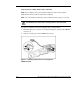
IMPORTANT: Connecting the diagnostic cable to the diagnostic port automatically
disables the iLO connection on the rear of the server blade.
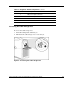
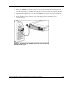
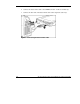
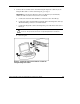
a. Connect the network cable with RJ-45 connectors to the client PC (1).
b. Connect the other end of the RJ-45 network cable to the diagnostic cable (2).
The kernel debug connector can remain unused.
c. Connect the diagnostic cable to the diagnostic port on the front of the server
blade (3).
CAUTION: Disconnect the diagnostic cable or the I/O cable from the port when
not in use. The port and connector do not provide permanent connections.
d. Go to step 10.
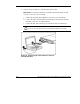
Figure 9: Connecting the server blade to a client PC
using the diagnostic cable