
HP ProLiant BL p-Class System Diagnostic Station User Guide
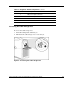
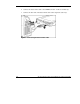
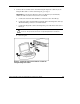
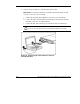

3. Place the VHDM converter on the rear of the server blade by inserting the tab
into the right side (1), making sure the pins on the left side are properly aligned.
4. Tighten the thumbscrew to secure the VHDM converter to the server blade (2).
5. Insert the DC power cord into one of the diagnostic station DC power
connectors (3).
Figure 7: Attaching the VHDM converter and connecting
the DC power cord
HP ProLiant BL p-Class System Diagnostic Station User Guide 17
HP CONFIDENTIAL
Writer: Amy Clute File Name: 230859-3.doc
Codename: Nipper Part Number: 230859-003 Last Saved On: 9/10/03 8:46 AM