
HP ProLiant BL e-Class System Setup and Installation Guide

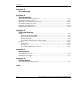

Contents
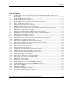
E-1 Enclosure front panel LEDs ..................................................................................... E-2
E-2 Rear panel LEDS with interconnect switch.............................................................. E-3
E-3 Rear panel LEDs with RJ-21 patch panel................................................................. E-6
E-4 Rear panel LEDs with RJ-45 patch panel................................................................. E-9
E-5 Hot-plug fan health LEDs ...................................................................................... E-12
E-6 Server blade LEDs ................................................................................................. E-13
E-7 Diagnostic adapter LEDs........................................................................................ E-13
E-8 Enclosure front panel buttons................................................................................. E-16
E-9 Enclosure rear panel buttons .................................................................................. E-17
E-10 Server blade maintenance switches ........................................................................ E-18
G-1 Locating and removing the battery on the server blade ........................................... G-2
G-2 Installing the new battery .........................................................................................G-3
List of Tables
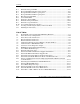
2-1 ProLiant BL e-Class Standard Rack Mounting Hardware ........................................2-8
2-2 Interconnect Tray Configurations ...........................................................................2-10
3-1 Interconnect Switch Connectors..............................................................................3-16
3-2 RJ-21 Patch Panel Connectors ................................................................................3-17
3-3 RJ-45 Patch Panel Connectors ................................................................................3-18
3-4 Cable Pinout (Sample for Server Blades 1 through 10 NIC 1) ...............................3-22
3-5 Cable Pinout for a Null-Modem Cable....................................................................3-23
3-6 Connectors on the Diagnostic Adapter....................................................................3-36
4-1 ROM-Based Setup Utility Default Settings ..............................................................4-5
4-2 Server Blade Event Messages .................................................................................4-13
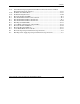
D-1 Enclosure Diagnostic Steps ...................................................................................... D-5
D-2 Is the Power LED on Both Power Supplies Solid Green?........................................ D-5
D-3 Is the Fault LED on Both Power Supplies Off? ....................................................... D-7
D-4 Is the Enclosure Power LED on the Rear Panel Green?........................................... D-9
D-5 Is the Enclosure Health LED on the Front of the Enclosure On?........................... D-10
D-6 Is the Local Management Console Displaying Information When Connected
to the Enclosure? .................................................................................................... D-11
D-7 Is the Integrated Administrator Health LED Green?.............................................. D-12
D-8 Is the Fan Health LED Green? ............................................................................... D-13
D-9 Server Blade Diagnostic Steps ............................................................................... D-15
D-10 Is the Power LED on the Server Blade Green? ...................................................... D-16
D-11 Is the Health LED on the Server Blade Green?...................................................... D-17
D-12 Is the NIC 1 or NIC 2 LED on the Server Blade Illuminated?............................... D-18
viii HP ProLiant BL e-Class System Setup and Installation Guide
HP CONFIDENTIAL
Writer: Karen Hale File Name: a-frnt.doc
Codename: MacDuff Part Number: 249068-003 Last Saved On: 5/21/03 2:58 PM