
HP ProLiant BL e-Class System Setup and Installation Guide

Installing and Cabling the System
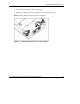
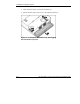
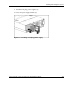
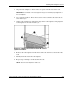
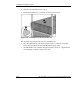
4. Slide the enclosure fully into the rack (1).
5. Tighten the thumbscrews to secure the enclosure in the rack (2).
Figure 3-10: Installing the enclosure into the rack
The enclosure ships with two different sizes of thumbscrews:
•
•
Size 10-32 thumbscrews with white hexagonal washers, which are compatible
with Compaq branded racks and some HP and third-party racks
Size M6 thumbscrews with black hexagonal washers, which are compatible with
some third-party racks that require metric sizes
3-12 HP ProLiant BL e-Class System Setup and Installation Guide
HP CONFIDENTIAL
Writer: Karen Hale File Name: d-ch3 Installing and Cabling the System.doc
Codename: MacDuff Part Number: 249068-003 Last Saved On: 5/21/03 3:04 PM