
HP ProLiant BL e-Class System Setup and Installation Guide

Installing and Cabling the System
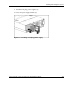
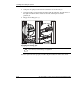
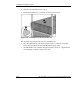
7. Insert the interconnect tray into the enclosure (1).
8. Rotate the interconnect tray levers to the locked position (2).
Figure 3-3: Inserting the interconnect tray and engaging
the interconnect tray levers
3-4 HP ProLiant BL e-Class System Setup and Installation Guide
HP CONFIDENTIAL
Writer: Karen Hale File Name: d-ch3 Installing and Cabling the System.doc
Codename: MacDuff Part Number: 249068-003 Last Saved On: 5/21/03 3:04 PM