
HP ProLiant BL e-Class System Setup and Installation Guide


Contents
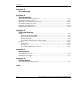
ProLiant BL e-Class Server Blade Enclosure Warnings and Cautions............................2-4
Preparing for Software Deployment ................................................................................2-6
Rapid Deployment Pack............................................................................................2-6
Alternate Deployment Method..................................................................................2-6
Shipping Contents............................................................................................................2-6
Server Blade Enclosure .............................................................................................2-7
Rack Mounting Hardware .........................................................................................2-8
Server Blades.............................................................................................................2-9
Interconnect Trays.....................................................................................................2-9
Optional Installation Service..........................................................................................2-10
Chapter 3
Installing and Cabling the System
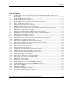
Installing the Interconnect Tray .......................................................................................3-2
Measuring with the Rack Template .................................................................................3-6
Installing the Rack Rails ..................................................................................................3-8
Installing the Enclosure into the Rack ...........................................................................3-11
Cabling the ProLiant BL e-Class System ......................................................................3-14
Identifying Interconnect Tray Connectors...............................................................3-15
Cabling the Enclosure .............................................................................................3-18
Powering Up the ProLiant BL e-Class System..............................................................3-23
Powering Down the ProLiant BL e-Class System.........................................................3-23
Powering Down a Server Blade ..............................................................................3-24
Powering Down the Enclosure ................................................................................3-25
Installing a Server Blade................................................................................................3-25
Removing a Server Blade ..............................................................................................3-29
Installing Additional Memory........................................................................................3-30
Attaching the Diagnostic Adapter..................................................................................3-35
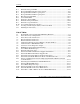
Chapter 4
Deployment and Management
ProLiant BL e-Class Server Blade Deployment Options.................................................4-2
Automated Deployment Using HP ProLiant Essentials Rapid Deployment Pack....4-2
Alternate Deployment Methods ................................................................................4-3
Diagnostic Adapter....................................................................................................4-4
ProLiant BL e-Class Server Blade Supported Software Utilities ....................................4-4
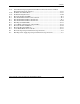
Supported Operating Systems ...................................................................................4-4
iv HP ProLiant BL e-Class System Setup and Installation Guide
HP CONFIDENTIAL
Writer: Karen Hale File Name: a-frnt.doc
Codename: MacDuff Part Number: 249068-003 Last Saved On: 5/21/03 2:58 PM