
HP ProLiant BL e-Class System Setup and Installation Guide

Index
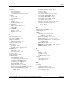
memory See also DIMMs
power LEDs 1-9, E-4, E-7, E-10, E-14
ECC 1-14
power sources symbol xii
features 1-8, 3-30
powering down
supported speed 1-8, 3-30
emergency shut down 3-25
video 1-10
enclosure 3-25
mouse compliance statement A-4
server blade 3-24
powering up
enclosure 3-23
N
server blades 3-23
NICs
features 1-10
R
LEDs 1-10, E-14
rack
stabilization 2-2
O
telco, stability of 2-2
Online Flash Utility 4-9
ventilation, caution 2-2, 2-3
operating systems
warnings 2-2
supported 4-4
rack mounting hardware, shipping
contents 2-8
USB diskette drive unsupported 2-6
optimum environment 2-1
rack rails
options
adjusting 3-8
installation service 2-10
features 2-9
RJ-21 patch panel 1-1
installing 2-9, 3-8
shipping contents 2-8
P
rack stability, warning xiii
rack template 2-8, 3-6
patch panels, RJ-21
RBSU See ROM-Based Setup Utility
(RBSU)
connectors 3-16
features 1-1
rear panel switches E-17
interconnect trays 2-9
redundancy features 1-4
patch panels, RJ-45
redundant ROM
connectors 3-17
features 1-11
features 1-1
support 4-6
interconnect trays 2-9
regulatory compliance
POST error messages
identification number A-1
use for diagnosis D-11, D-18
regulatory compliance notices
where to find C-1
cables A-4
power
Canada A-4
rated input F-2
Class A A-2
warning xii
Class B A-2
power button E-16, E-17
European Union A-5
power cords, connecting 3-19
HP ProLiant BL e-Class System Setup and Installation Guide Index-5
HP CONFIDENTIAL
Writer: Karen Hale File Name: x-index.doc
Codename: MacDuff Part Number: 249068-003 Last Saved On: 5/21/03 3:20 PM