
ProLiant BL e-Class C-GbE Interconnect Switch Web-based Interface Reference Guide

Configuring the Switch Modules using the Web-based Interface
2-70 HP ProLiant BL e-Class C-GbE Interconnect Switch Web-based Interface Reference Guide
Rebooting the Switch Module
You can perform a reboot of the switch module, which resets the system. To restart the
system:
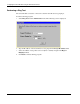
1. Select Restart System from the Maintenance menu. The following screen is displayed.
2. Select Yes or No to save the settings.
3. Click Restart.
Setting the Web Connection Timeout
To set the Web connection timeout interval:
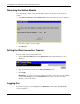
1. Select Connection Timeout from the Maintenance menu. The following screen is
displayed.
2. Type the desired age-out time in the Timeout (minutes) field.
3. Click Apply.
IMPORTANT: To save the configuration settings permanently, you must enter them into NVRAM
using the Save Changes option on the Maintenance menu. Refer to the section, “Saving
Changes,” earlier in this chapter.
Logging Out
To exit the setup pages, select Logout on the Maintenance menu. The Account Login
screen is displayed.