
ProLiant BL e-Class C-GbE Interconnect Switch Web-based Interface Reference Guide

Configuring the Switch Modules using the Web-based Interface
Resetting the Switch Module Configuration to Factory Defaults
To reset the switch module configuration to the factory defaults:
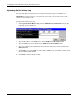
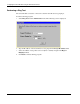
1. Select Factory Reset from the Maintenance menu. The following screen is displayed.
2. Select Yes or No to keep the system IP address. If you want your IP address to default
from DHCP or BOOTP, select No.
3. Click Reset to Factory Default to reset the switch module.
HP ProLiant BL e-Class C-GbE Interconnect Switch Web-based Interface Reference Guide 2-69