
ProLiant BL e-Class C-GbE Interconnect Switch Web-based Interface Reference Guide

Configuring the Switch Modules using the Web-based Interface
Performing a Ping Test
The switch module can test the connection to another network device by pinging it.
To initiate the Ping program:
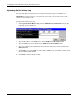
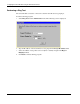
1. Select Ping Test from the Maintenance menu. The following screen is displayed.
2. Type the IP address of the network device to be pinged in the Target IP Address field.
3. Select the number of test packets to be sent (three is usually enough) in the Repeat
Pinging for field.
4. Click Start to initiate the Ping program.
2-68 HP ProLiant BL e-Class C-GbE Interconnect Switch Web-based Interface Reference Guide