
ProLiant BL e-Class C-GbE Interconnect Switch Web-based Interface Reference Guide

Configuring the Switch Modules using the Web-based Interface
Displaying Switch Module History
The switch module can record event information to its own logs, to designated SNMP trap
receiving stations, and to the PC connected to the console manager.
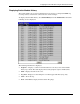
To display switch module history, select Switch History from the Maintenance menu. The
following screen is displayed.
The following information is displayed:
•
•
•
•
•
Sequence—Displays a counter incremented whenever an entry to the switch module
history log is made. The table displays the last entry (highest sequence number) first.
Time—Displays the time of the event.
Log Text—Displays text describing the event that triggered the history log entry.
Clear—Clears the log.
Next—Click Next to display all of the Switch Trap Logs.
HP ProLiant BL e-Class C-GbE Interconnect Switch Web-based Interface Reference Guide 2-67