
ProLiant BL e-Class C-GbE Interconnect Switch Web-based Interface Reference Guide

Overview
Accessing the Switch Modules
Before you can connect to a switch module using the Web-based interface, you must set up
the IP address. By default, if there is a DHCP server on the network, a switch module obtains
the IP address automatically. You can locate the IP address by accessing the switch module
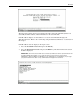
through the Integrated Administrator. The IP address displays on the switch module logon
screen.
If there is no DHCP server on the network, access each switch module through the Integrated
Administrator and configure the IP address.
NOTE: The Integrated Administrator must be configured before you can use it to access and configure
the interconnect switch. For information on how to configure the Integrated Administrator, refer to the
“Configuring the Integrated Administrator” section in the HP ProLiant BL e-Class C-GbE Interconnect
Switch User Guide.
Access the switch modules from the Integrated Administrator command line interface, using
one of the following methods:
•
•
If you have already logged into the Integrated Administrator as the “Administrator,” you
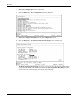
can connect to either switch module console by typing one of the following commands:
connect switch a to access Switch A
or
connect switch b to access Switch B
If you have not logged on to the Integrated Administrator, you can type one of two
special logon accounts to access the switch module consoles directly, depending on
whether you want to access Switch A or Switch B. At the login prompt type in both the
user name and password as either:
switcha
or
switchb
The logon screen for Switch A or Switch B will now be displayed.
1-2 HP ProLiant BL e-Class C-GbE Interconnect Switch Web-based Interface Reference Guide