
ProLiant BL e-Class C-GbE Interconnect Switch Web-based Interface Reference Guide

Configuring the Switch Modules using the Web-based Interface
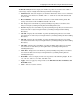
• Clear All—Click this to clear all forwarding table entries.
•
•
•
•
•
•
Clear By Port—Click this to clear the forwarding table entries that have the entered port
number.
VID—Identifies the VLAN ID of the VLAN that the port is a member of.
MAC Address—Identifies the MAC address entered into the address table.
Port—Identifies the port that the MAC address corresponds to.
Learned—Identifies the method that the switch module used to discover the MAC
address.
Next—Click this to view the next page of the address table.
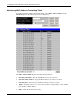
Monitoring IGMP Snooping Table
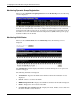
To monitor IGMP snooping, select IGMP Snooping from the Monitoring menu. The
following screen is displayed.
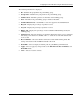
The IGMP Snooping Table is organized by VLAN ID (VID) and displays the following
information:
•
•
•
•
•
•
VID—Type the VLAN ID of the VLAN for which the IGMP Snooping table is to be
displayed.
Search—Click to search the IGMP Snooping Table for the current VID.
Multicast Group—Displays the IP address of a multicast group discovered by IGMP
Snooping.
MAC Address—Displays the corresponding MAC address discovered by IGMP
Snooping.
Port Map—Displays the ports that have forwarded multicast packets.
Reports—Displays the number of IGMP reports for the listed source.
HP ProLiant BL e-Class C-GbE Interconnect Switch Web-based Interface Reference Guide 2-61