
ProLiant BL e-Class C-GbE Interconnect Switch Web-based Interface Reference Guide

Configuring the Switch Modules using the Web-based Interface
The following information is displayed:
•
•
•
•
•
•
•
•
•
•
•
•
•
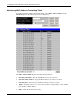
ID—Identifies the group ID for the port trunking group.
Group Name—Identifies the group name for the port trunking group.
Member Ports—Identifies ports that are members of the trunking group.
State—Identifies if the port trunking group is enabled or disabled.
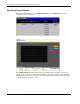
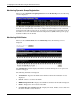
Trunk Utilization View—Click View to view a line graph for the trunk utilization
Rx_Util—Displays the percentage of packets received.
Tx_Util—Displays the percentage of packets received.
R&Tx_Util—Displays the percentage of total available bandwidth being used by the
trunking group.
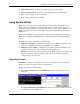
Time Interval—Select the frequency at which the information on the screen is refreshed.
The setting can be between 1s and 60s, where “s” stands for seconds. The default value
is one second.
Record Number—Select the number of times the switch module will be polled. The
setting can be between 20 and 200. The default value is 20.
Show/Hide—Select to display or hide Rx_Util, Tx_Util, R&Tx_Util information.
Apply—Select to apply any changes made to the Time Interval, Record Number, and
Show/Hide fields.
Clear—Select to reset the counters.
HP ProLiant BL e-Class C-GbE Interconnect Switch Web-based Interface Reference Guide 2-59