
ProLiant BL e-Class C-GbE Interconnect Switch Web-based Interface Reference Guide

Configuring the Switch Modules using the Web-based Interface
Monitoring Trunk Utilization
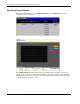
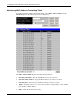
To monitor trunk utilization, select Trunk Utilization from the Monitoring menu. The
following screens are displayed.
The Trunk Utilization window displays the port trunking groups and allows you to view
graphs of three items for an individual port trunking group: the percentage of total available
bandwidth being used by the group, the percentage of packets transmitted, and the percentage
of packets being received per second.
2-58 HP ProLiant BL e-Class C-GbE Interconnect Switch Web-based Interface Reference Guide