
ProLiant BL e-Class C-GbE Interconnect Switch Web-based Interface Reference Guide

Configuring the Switch Modules using the Web-based Interface
Monitoring Port Utilization
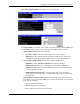
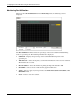
When you select Port Utilization from the Monitoring menu, the following screen is
displayed.
The Port Utilization window shows the percentage of the total available bandwidth being
used on a specified port. The following information is displayed:
•
•
•
•
•
•
Utilization—Displays the percentage of the total bandwidth being used on the
specified port.
Time Interval—Select the frequency at which the information on the screen is refreshed.
The default is two seconds.
Record Number—Select the number of polling attempts. The default is 200.
Show/Hide—Select to show or hide the line graph for utilization.
Apply—Select to apply any changes made to the Time Interval, Record Number, and
Show/Hide fields.
Clear—Select to reset the counters.
2-46 HP ProLiant BL e-Class C-GbE Interconnect Switch Web-based Interface Reference Guide