
ProLiant BL e-Class C-GbE Interconnect Switch Web-based Interface Reference Guide

Configuring the Switch Modules using the Web-based Interface
IMPORTANT: To save the configuration settings permanently, you must enter them into NVRAM using
the Save Changes option on the Maintenance menu. Refer to the section, “Saving Changes,” earlier in
this chapter.
Configuring the Security IP
You can enter a list of IP addresses that are allowed to access the switch by means of SNMP,
Telnet, and the Web.
To specify which IP addresses are allowed to access the switch module:
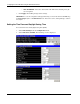
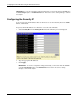
1. Select Security IP from the Management menu. The following screen is displayed.
2. Type the appropriate IP addresses.
3. Click Apply.
IMPORTANT: To save the configuration settings permanently, you must enter them into NVRAM
using the Save Changes option on the Maintenance menu. Refer to the section, “Saving
Changes,” earlier in this chapter.
2-42 HP ProLiant BL e-Class C-GbE Interconnect Switch Web-based Interface Reference Guide