
ProLiant BL e-Class C-GbE Interconnect Switch Web-based Interface Reference Guide

Configuring the Switch Modules using the Web-based Interface
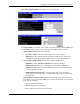
— Time in HH MM—Select the current time in hh mm format. Leading zeros (0)
are not required.
3. Click Apply after making changes to the settings.
IMPORTANT: To save the configuration settings permanently, you must enter them into NVRAM using
the Save Changes option on the Maintenance menu. Refer to the section, “Saving Changes,” earlier in
this chapter.
Setting the Time Zone and Daylight Saving Time
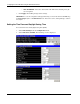
To set the time zone and daylight saving time (DST):
1. Select Time Settings from the Configuration menu.
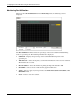
2. Select Time Zone and DST. The following screen is displayed:
2-40 HP ProLiant BL e-Class C-GbE Interconnect Switch Web-based Interface Reference Guide