
ProLiant BL e-Class C-GbE Interconnect Switch Web-based Interface Reference Guide

Configuring the Switch Modules using the Web-based Interface
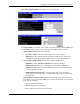
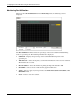
2. Select Current Time Settings. The following screen is displayed.
The Current Time screen allows you to set the current time and date, enable SNMP, and
set the SNMP parameters. The screen is divided into the following three sections:
— Current Time: Status displays the following:
— System Boot Time—The date and time when the last boot occurred
— Time Source—The method in which the switch module gets the current time
information: System Clock, Primary SNTP Server, or Secondary SNTP Server
— Current Time: SNTP Settings allows you to configure SNTP service:
— SNTP State—Select Disabled or Enabled. The default is disabled.
— SNTP Primary Server—Type the IP address for the primary SNTP server.
— SNTP Secondary Server— Type the IP address for the secondary SNTP server,
or leave as 0.0.0.0 to disable.
— SNTP Poll Interval in Seconds—Type the polling interval (in seconds) for
requesting the time from the server. A number from 30 to 99999 is allowed. The
default is 720.
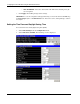
— Current Time: Set Current Time allows you to manually set the current date and
time. This screen is grayed out if SNTP state is enabled. To manually set the date and
time, enter the following:
— Year—Select the current year.
— Month—Select the current month.
— Day—Select of the current day of the month.
HP ProLiant BL e-Class C-GbE Interconnect Switch Web-based Interface Reference Guide 2-39