
ProLiant BL e-Class C-GbE Interconnect Switch Web-based Interface Reference Guide

Configuring the Switch Modules using the Web-based Interface
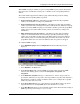
To enable STP on the port level:
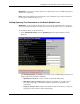
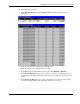
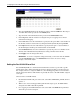
1. Select STP Port Settings from the Spanning Tree menu. The following screen is
displayed.
2. Select the first port to be configured in the From field.
3. Select the last port to be configured in the To field.
4. In the State field, select the STP state for the port, either Enabled or Disabled.
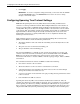
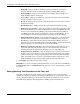
5. In the Cost (1–65535) field, type a port cost between 1 and 65,535. The lower the cost,
the greater the probability that the port will be chosen as the designated port to forward
packets.
6. In the Priority (0–255) field, type a port priority from 0 to 255. The lower the priority,
the greater the probability that the port will be chosen as the root port.
HP ProLiant BL e-Class C-GbE Interconnect Switch Web-based Interface Reference Guide 2-21