
ProLiant BL e-Class C-GbE Interconnect Switch Web-based Interface Reference Guide

Configuring the Switch Modules using the Web-based Interface
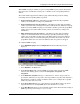
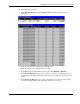
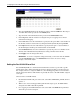
— Bridge ID—Displays the ID of the bridge (switch) used only for spanning tree
functions. The ID is made up of the bridge priority and bridge MAC address.
— Designated Root—Displays the current elected root bridge. The root bridge has a
bridge ID lower than the other bridges.
— Cost to Root—Displays the summation of all path costs between the current bridge
and the root bridge via the root port.
— Root Port—Displays the port on the current bridge that has the best path to reach the
designated root bridge.
— Root Priority (Sec)—Displays the priority of the current designated root bridge.
— Bridge Max Age (6–40 Sec)—Type the maximum age. The range is 6 to 40 seconds.
When the maximum age is reached, if a Bridge Protocol Data Unit (BPDU) has still
not been received from the Root Bridge, your switch module will start sending its
own BPDU to all other switches for permission to become the Root Bridge. If your
switch module has the lowest bridge identifier, it will become the Root Bridge.
— Bridge Hello Time (1–10 Sec)—Type the hello time. The range is 1 to 10 seconds.
This time is the interval between two transmissions of BPDU packets sent by the
Root Bridge to tell all other switches that it is indeed the Root Bridge. If you set a
hello time for your switch module and it is not the Root Bridge, the default hello time
will be used until your switch module becomes the Root Bridge.
— Bridge Forward Delay (4–30 Sec)—Type the forward delay time. The range is 4 to
30 seconds. This interval is the time any port on the switch module spends in the
listening state while moving from the blocking state to the forwarding state.
— Bridge Priority (0–65535 Sec)—Type the bridge priority. A priority for the switch
module can be set from 0 to 65,535. Zero indicates the highest priority. The priority
number is used in the voting process between switches on the network to determine
which switch will be the root switch. A low number indicates a high priority, and a
higher probability that this switch module will be elected as the root switch.
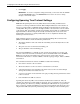
2. Click Apply after making changes to the settings.
IMPORTANT: To save the configuration settings permanently, you must enter them into NVRAM using
the Save Changes option on the Maintenance menu. Refer to the section, “Saving Changes,” earlier in
this chapter.
Setting Spanning Tree Parameters on the Port Level
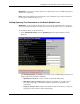
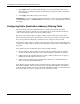
Once STP is enabled on the switch module, you can configure ports to participate in the
spanning tree domain, by enabling or disabling the STP function on a per port basis. Ports can
also be configured in STP bypass mode (fast forward mode) that allows the port to skip the
initial STP states (listening and learning) before enabling it in the forwarding state.
2-20 HP ProLiant BL e-Class C-GbE Interconnect Switch Web-based Interface Reference Guide