
ProLiant BL e-Class C-GbE Interconnect Switch Web-based Interface Reference Guide

Configuring the Switch Modules using the Web-based Interface
IMPORTANT: The interconnect switch supports mono-Spanning Tree Protocol. Multiple Spanning Tree
domains are not supported.
NOTE: Refer to Appendix D in the HP ProLiant BL e-Class C-GbE Interconnect Switch User Guide for
more information on Spanning Tree Protocol.
Setting Spanning Tree Parameters on the Switch Module Level
IMPORTANT: The factory default settings should cover the majority of installations. HP recommends
that you keep the default settings as set at the factory unless it is absolutely necessary to change them.
To set STP parameters on the switch level:
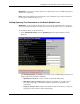
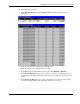
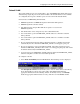
1. Select STP Switch Settings from the Spanning Tree menu. The following screen is
displayed.
The Switch Spanning Tree Settings screen allows you to configure STP parameters and
displays STP status information, including:
— Spanning Tree Protocol—Select to enable or disable the STP setting.
— Time Since Topology Changes (Sec)—Displays the number of seconds since the
last change in topology occurred that caused the spanning tree algorithm to be
recalculated.
— Topology Change Count—Displays the number of times there has been a change in
topology since the last reboot of the current bridge.
HP ProLiant BL e-Class C-GbE Interconnect Switch Web-based Interface Reference Guide 2-19