
ProLiant BL e-Class C-GbE Interconnect Switch Web-based Interface Reference Guide

Configuring the Switch Modules using the Web-based Interface
When IGMP snooping is enabled, any port receiving IGMP response packets will forward
them to the CPU, and the CPU sets this port as a member of the corresponding multicast
address.
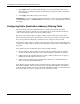
The switch module supports three multicast group address filtering modes for making
forwarding decisions regarding multicast packets.
•
•
•
Forward all group addresses—All multicast packets destined for all group MAC
addresses are forwarded according to the VLAN rules.
Forward all unregistered group addresses—All multicast packets with group MAC
address registration entries existing in the multicast table (both static multicast and group
multicast created by IGMP snooping) are forwarded to member ports. If the group MAC
address does not exist in the multicast table, packets are forwarded according to the
VLAN rules.
Filter all unregistered group addresses—All multicast packets with group MAC
addresses are forwarded only if such forwarding is explicitly permitted by a group
address entry in the multicast table. If the group MAC address exists in the multicast
table, then the packets are forwarded using the port member list for that entry. If the
group MAC address does not exist in the multicast table, the packets are dropped.
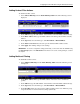
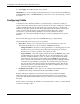
To configure IGMP snooping:
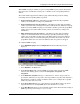
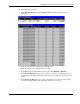
1. Select IGMP Snooping from the Configuration menu. The following screen is
displayed.
2. Select a VID number in the VLAN ID field.
3. Select Enabled in the State field.
4. In the Querier State field, select the IGMP version that will be used by the IGMP
interface when making queries. Select from Non-Querier, V1-Querier, and
V2-Querier.
5. In the Robustness Variable field, type a value between 1 and 255. Larger values are
specified for subnets that are expected to lose larger numbers of packets. The default is 2.
The robustness variable is a tuning variable that allows you to configure the acceptable
number of packets that may be lost.
6. In the Query Interval field, type a value between 1 and 65,500 seconds to specify the
length of time between sending IGMP queries. The default is 125 seconds.
7. In the Max Response field, type the maximum amount of time allowed before sending an
IGMP response report. The range is 1 to 25 seconds.
HP ProLiant BL e-Class C-GbE Interconnect Switch Web-based Interface Reference Guide 2-17