
ProLiant BL e-Class C-GbE Interconnect Switch Web-based Interface Reference Guide

Configuring the Switch Modules using the Web-based Interface
To configure port trunking:
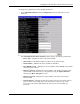
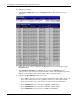
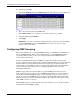
1. Select Port Trunking from the Configuration menu. The following screen is displayed.
2. Type a user-assigned name in the Name field.
3. In the Member Ports area, check the ports that will compose the port trunk.
4. Change the State field to Enabled.
5. Click Apply.
IMPORTANT: To save the configuration settings permanently, you must enter them into NVRAM
using the Save Changes option on the Maintenance menu. Refer to the section, “Saving
Changes,” earlier in this chapter.
Configuring IGMP Snooping
This section describes how to configure IGMP snooping on a VLAN ID. For information on
how to set IGMP globally on the switch module and how to set the IGMP filter mode for
processing multicast packets, refer to the “Setting Advanced Switch Module Features”
section earlier in this chapter.
Internet Group Management Protocol (IGMP) snooping, when enabled and configured
properly, manages multicast traffic through a switch module. IP multicast traffic is forwarded
based on multicast group membership information registered by the switch module. The
switch module can use IGMP snooping to configure ports dynamically, so that IP multicast
traffic is forwarded only to those ports associated with IP multicast hosts, based on
membership information.
IGMP snooping allows the switch module to recognize IGMP queries and reports sent
between network stations or devices and an IGMP host that belongs to a specific multicast
group. When enabled for IGMP snooping, the switch module can open or close a port to a
specific device based on IGMP messages passing through the module. This feature further
limits unnecessary broadcasts. The switch module can be configured to make queries using
either IGMP version 1 or version 2.
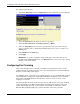
When IGMP snooping is enabled globally on the switch module, you can enable or disable
individual VLANs for IGMP snooping.
2-16 HP ProLiant BL e-Class C-GbE Interconnect Switch Web-based Interface Reference Guide