
ProLiant BL e-Class C-GbE Interconnect Switch Web-based Interface Reference Guide

Configuring the Switch Modules using the Web-based Interface
To configure port settings:
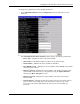
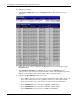
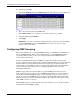
1. Select Port Configuration from the Configuration menu. The following screen is
displayed.
2. Select the port you want to configure in the Port field. The port name displays in the
Port Name field.
3. Select Enabled or Disabled in the State field. If you selec1t Disabled, devices
connected to that port cannot use the switch module, and the switch module purges their
addresses from its address table after the MAC address aging time elapses.
4. Configure the Speed/Duplex setting for the port:
— Select Auto to allow the port to select the best transmission speed, duplex mode, and
flow control settings based on the capabilities of the device at the other end. The
other selections allow you to force the port to operate in the specified manner.
— Select 100M/FULL for port operation at 100 Mb/s and full duplex.
— Select 100M/HALF for port operation at 100 Mb/s and half duplex.
— Select 10M/FULL for port operation at 10 Mb/s and full duplex.
2-12 HP ProLiant BL e-Class C-GbE Interconnect Switch Web-based Interface Reference Guide