
ProLiant BL e-Class C-GbE Interconnect Switch Web-based Interface Reference Guide

Configuring the Switch Modules using the Web-based Interface
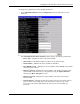
The MAC address aging timer prunes the forwarding table addresses entries that are
no longer used. Dynamic forwarding table entries, which are made up of MAC
addresses and their associated port numbers, are deleted from the table if they are not
seen within the aging timeout. The aging time can be from 10 to 1,000,000 seconds
with a default value of 300 seconds. A very long aging time can result in dynamic
forwarding table entries that are out-of-date or no longer are used.
If the aging time is too short, however, many entries may be aged out too soon. This
will result in a high percentage of received packets whose destination addresses
cannot be found in the forwarding table. In this case the switch module will broadcast
the packet to all ports, negating many of the benefits of having a switch.
Static forwarding entries are not affected by the aging time.
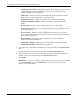
— IGMP Snooping—Select to enable or disable Internet Group Management Protocol
(IGMP) Snooping. IGMP Snooping enables the switch module to register IGMP
packets being forwarded through the switch module in order to obtain multicast
membership information from them, such as which ports are attached to which
multicast group members. For additional information, refer to the “Configuring
IGMP Snooping” section later in this chapter.
— GVRP Status—Select to enable or disable GARP VLAN Registration Protocol
(GVRP) on the switch module. GVRP allows dynamic propagation of VLAN
registration information across the GVRP-enabled switches on the same network. For
additional information, refer to the “Setting the Port VLAN ID for a Port” section
later in this chapter.
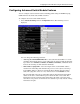
— Telnet Status—Select to enable or disable access to the switch module over the
network using the Telnet protocol.
— Default Telnet/RS232 Interface— Set either the CLI or menu-driven interface as
the default Telnet/RS232 interface.
— Web Status—Select to enable or disable management of the switch module over the
Web.
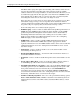
— Group Address Filter Mode—Select one of the forwarding or filtering options to
set the IGMP group address filter mode for forwarding multicast packets.
— Scheduling Mechanism for CoS Queues—Select one of the Class of Service queue
scheduling options. If you select Strict, then when the highest priority queue is full,
those packets will be the first to be forwarded. If you select RoundRobin, the
forwarding is based on the settings made on the Class of Service Configuration
screen. For more information, refer to the “Configuring the Class of Service, Default
Port Priority, and Traffic Class” section later in this chapter.
— Trunk Load Sharing Algorithm—Select one of the port trunk load sharing options,
Source Addr, Destination Addr, or Both, to determine if load balancing decisions
will be made based on the source MAC address, destination MAC address, or both
addresses.
2-10 HP ProLiant BL e-Class C-GbE Interconnect Switch Web-based Interface Reference Guide