
ProLiant BL e-Class C-GbE Interconnect Switch Web-based Interface Reference Guide

Configuring the Switch Modules using the Web-based Interface
Configuring Advanced Switch Module Features
You can configure advanced switch features including global settings for IGMP snooping,
GVRP, Telnet status, Web status, SNTP, and others.
To configure advanced switch module features:
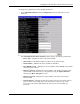
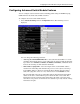
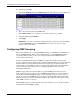
1. Select Advanced Settings from the Configuration menu. The following screen is
displayed.
You can change the following parameters:
— Auto Logout of Telnet/RS232 Interface—Select the time that the RS-232 console
and Telnet management interface can be idle before the switch module automatically
logs-out the user: 2 minutes, 5 minutes, 10 minutes, 15 minutes, and Never. Never
indicates never timing out. The default is 10 minutes.
— MAC Address Aging Time—Select the length of time a learned MAC address
remains in the forwarding table without being seen as a source (that is, how long a
learned MAC address is allowed to remain idle before deleting from the address
table). The aging time can be set to any value between 1 and 1,000,000 seconds.
The switch module enters into its forwarding table the mapping between the MAC
address of the device and the Ethernet port to which the device is attached. This
information is used to forward packets. This reduces the traffic congestion on the
network, because packets are forwarded to the destination port only, instead of being
forwarded to all ports.
HP ProLiant BL e-Class C-GbE Interconnect Switch Web-based Interface Reference Guide 2-9