
ProLiant BL e-Class C-GbE Interconnect Switch Web-based Interface Reference Guide

Configuring the Switch Modules using the Web-based Interface
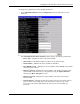
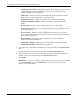
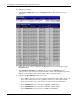
— Configuration Save Time—Displays the time the current settings were saved to the
configuration file. If the current time has never been set up on the interconnect
switch, “Unknown” will be displayed.
— Time Source—Displays how the switch module obtains the current time: Primary
SNTP Server, Secondary SNTP Server, or System Clock.
— Manufacturing Date—Displays the manufacture date of the switch module.
— Firmware Build Date-Number—Displays the firmware build date and build
number.
— System Name—Displays a user-configured name for the switch module.
— System Location—Displays a user-configured description for the physical location
of the switch module.
— System Contact—Displays the user-configured name of the person to contact if
there are any problems or questions with the system. You may also want to include a
phone number or extension.
— Option Number—Displays the option number for the switch module and
Interconnect Module combination.
— Switch Spare Number—Displays the spare part number for the switch module.
— Module Spare Number—This field is not applicable.
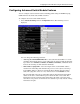
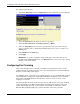
2. To complete the switch module information, type the system name in the System Name
field.
3. Type the physical location of the switch module in the System Location field.
4. Type the name of the contact person responsible for the switch module (and telephone
number or other contact information) in the System Contact field.
5. Click Apply.
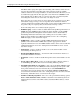
IMPORTANT: To save the configuration settings permanently, they must be entered into NVRAM
using the Save Changes option on the Maintenance menu. Refer to the section, “Saving
Changes,” earlier in this chapter.
2-8 HP ProLiant BL e-Class C-GbE Interconnect Switch Web-based Interface Reference Guide